The best email marketing campaigns to inspire 2027 have something to say and a good reason to reach the inbox. It might be a recipe, a new product worth trying, an invitation or a useful reminder. Design should make that reason visible and make the next step easy.
We have selected eight references to help you plan your 2027 email programme. They include creators documenting work for real brands on Behance and actual sends preserved by Email Love. You will find recent systems alongside older references that still offer useful lessons in structure, tone and continuity. Every case retains its original date.
This selection considers ideas, visual hierarchy and documented journeys. A design presentation lets us analyse a piece; it cannot certify its sales or reproduce its open rates. We are particularly interested in what you can learn to make your brand’s emails recognisable, relevant and easy to maintain.
Sending a beautiful email is one thing; building a relationship takes more. It needs a sensible schedule, messages with something to offer and a way to know when to stop following up. If you are bringing your channels together, pair this selection with our digital marketing trends for 2027.
1 Fyxer turns product use into content
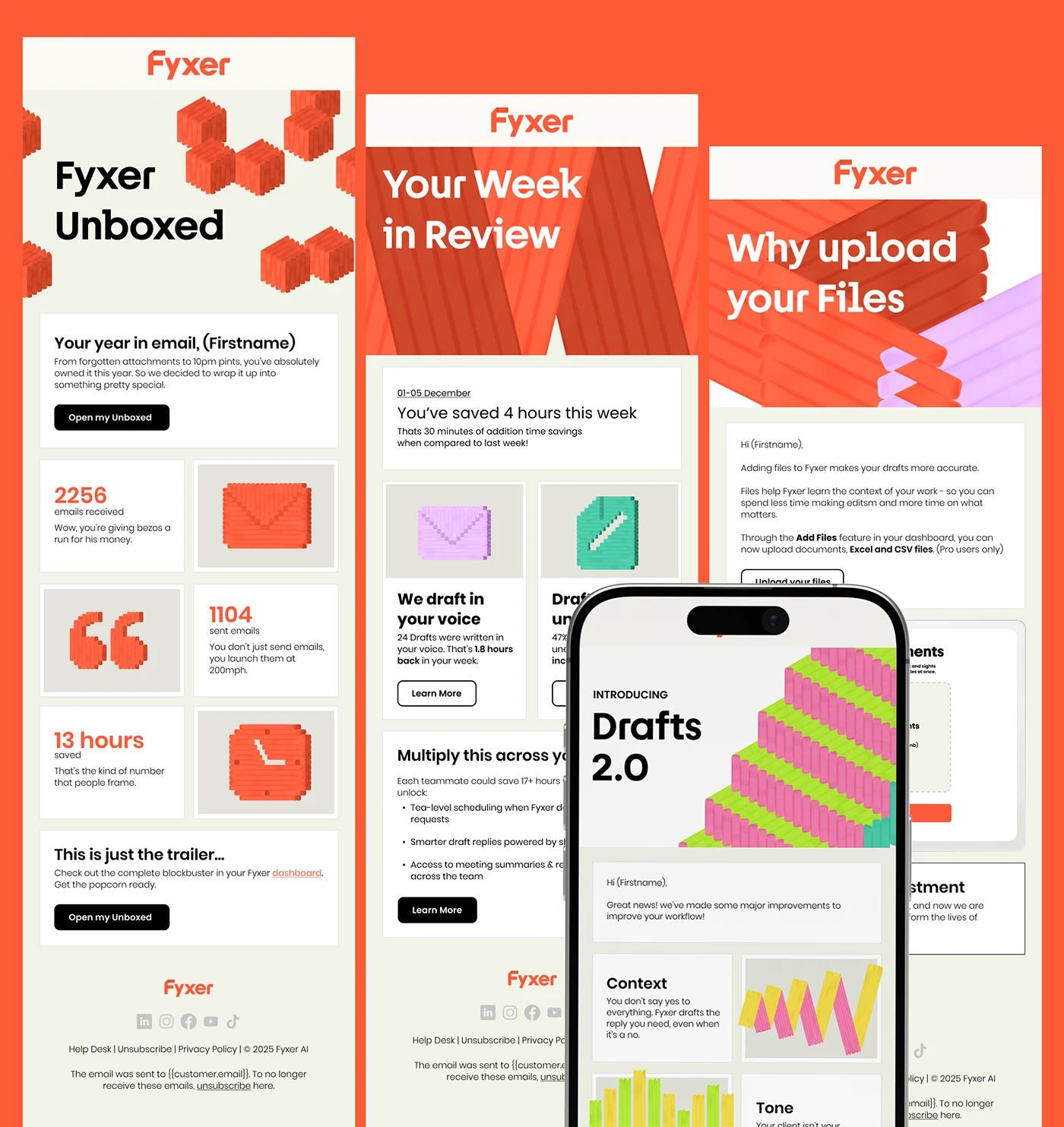
In 2026, James Jones presents a system of Fyxer campaigns and communications following the brand’s refresh. The documented scope includes user onboarding, product updates, educational communications and recurring formats. The image above brings together several pieces and a mobile layout.
Orange acts as an immediately recognisable signature. Large headings, geometric shapes and clear blocks organise different messages without changing personality. One execution shows an activity summary; another introduces a new feature. The system can vary its argument while retaining the way it presents it.
The activity summary is what makes the first piece interesting. Numbers sit in individual cards, with small geometric objects giving them character. The email gives the user something related to their experience of the service. The Drafts 2.0 launch, meanwhile, opens with an update. Two different reasons to read, sharing orange, blocks and a recognisable voice.
For a digital service, design should help distinguish personal information, explanation and action. The project’s cards organise that reading through different spacing and sizes. Our interpretation is that the structure helps sustain a content programme without starting every send from scratch.
An idea for 2027. A training business could prepare an email with three blocks: what the learner has completed, the next exercise and a resource to help them do it. That would be our own application of the thinking we see here. The button should open the outstanding task. If no activity has been recorded yet, prepare a starting version explaining where to begin. A greeting using their name can accompany the message; the value lies in information that actually changes according to what that person needs.
2 Elizabeth Scarlett keeps the brand present throughout the journey
In his work for Elizabeth Scarlett through Intentive Digital, James Jones documents a family of emails and flows published in 2026. The project covers welcome messages, reminders, campaigns, post-purchase communications and messages for different stages of the customer relationship.
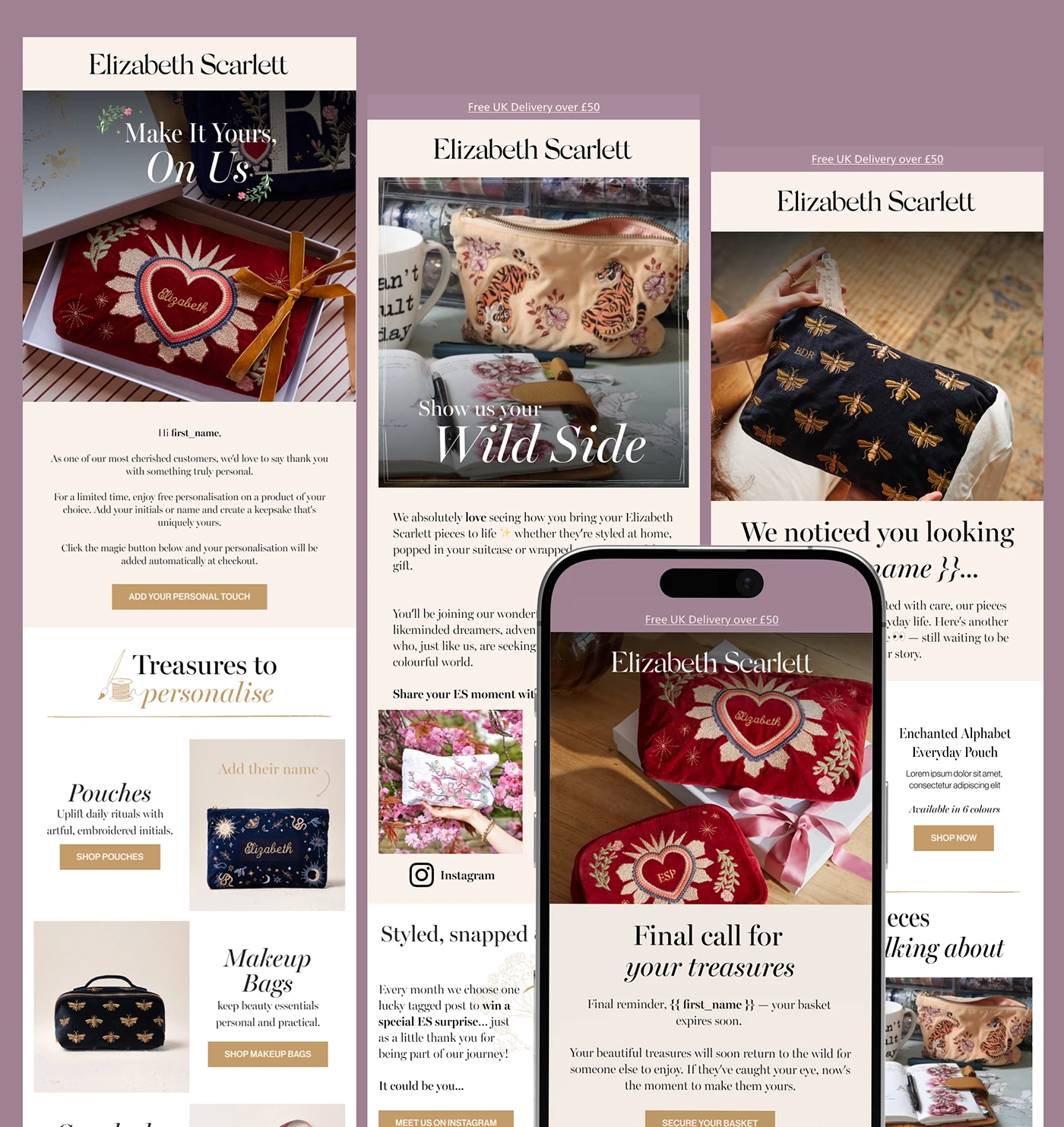
Photography of the embroidery, serif typography and gentle backgrounds create a presence connected to the product. Gold buttons establish a restrained hierarchy. The composition feels considered without relying on large promotional claims filling the email.
Looking at the pieces together reveals something valuable: the tone can support different objectives. A welcome email has a different job from a reminder or collection introduction. The structure changes, but the brand’s world remains. That continuity helps avoid the familiar jump from a carefully designed website to an email that seems to come from another business.
A welcome message does a different job from post-purchase care. The first needs to introduce the brand and help someone choose; later, you can explain how to look after the product already in their home. Including both within the same system also means deciding when to withdraw a reminder. A thoughtful flow knows when to move on to the next stage of the relationship.
An idea for 2027. For an accessories shop, we would propose a welcome email introducing product families and a post-delivery message with care instructions. Before triggering a reminder about a viewed item, check whether the person has already bought it: if so, they leave that journey. Also check its proximity to the scheduled newsletter. This is our suggestion, not Elizabeth Scarlett’s exact sequence. The useful lesson is to design each moment deliberately and in the same voice.
3 bareMinerals combines product, modules and mobile layouts
In 2026, Pablo Montellanos documents a Cordial-to-Klaviyo migration for Domaine. His work includes reproducing nearly fifteen templates from the previous platform, preparing reusable blocks and configuring automated communications. The examples shown are for bareMinerals. The credit concerns that adaptation and system construction, without attributing the brand’s original identity to him.
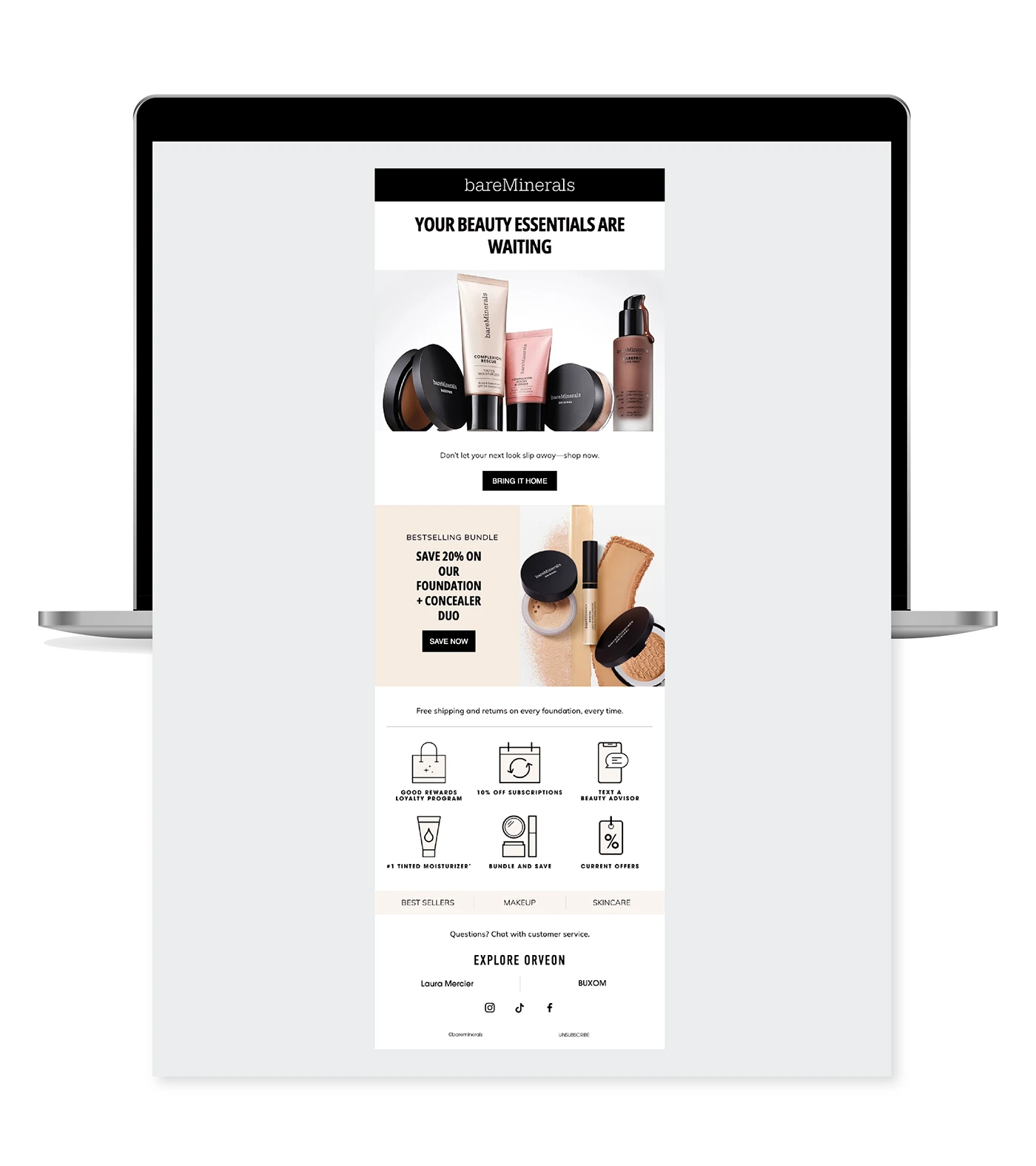
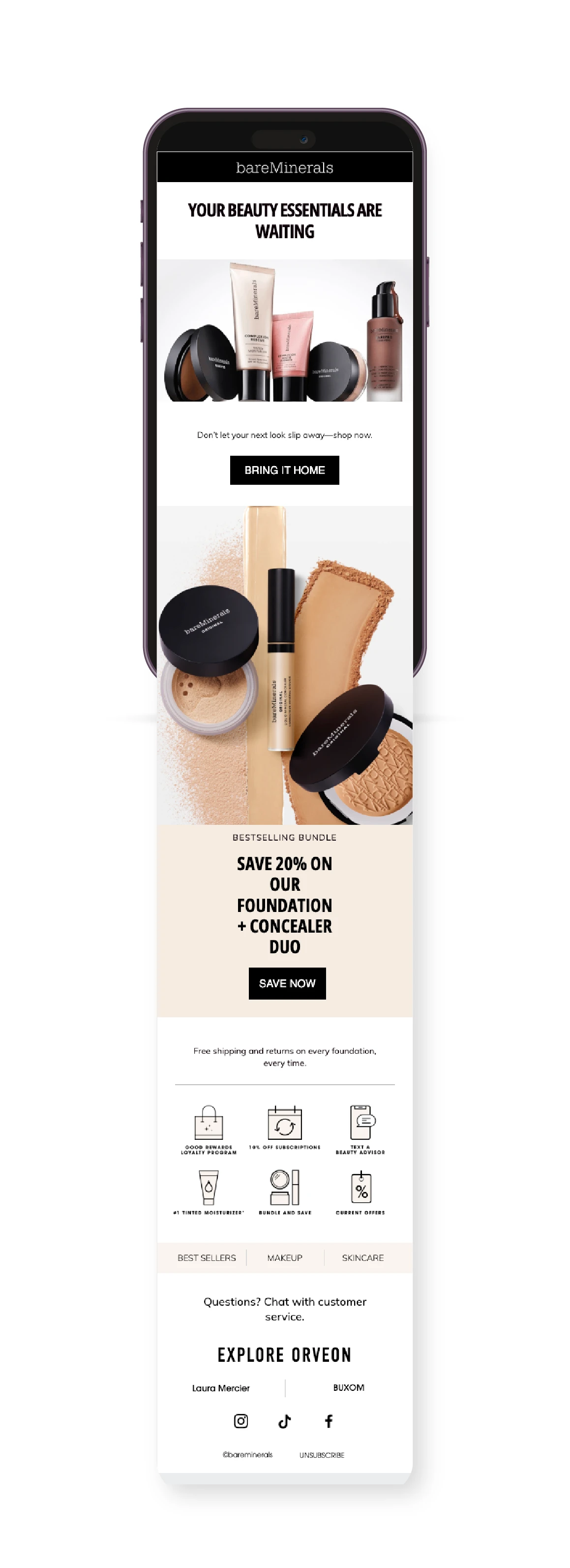
The product opens the email with a clean composition and a clear button. Further down, blocks introduce other propositions without losing order. Alternating backgrounds and photographs help separate reading units. The header and the combination of black, white and product colours make the brand recognisable.
What we would study here is the organisation of the modules. A team needs to change an image, offer or product family without dismantling the whole composition. It also needs to check how that information arranges itself on a narrow screen. A design that works only as a presentation board offers little flexibility for everyday production.
The migration tests a very practical question: can the person preparing the next send change a price or a line of copy without requesting a complete redesign? A useful template anticipates those changes, longer headings and the absence of a secondary image. It also needs a mobile version that reads comfortably. These questions help review a system before its limitations become recurring work.
An idea for 2027. If your business sends updates regularly, prepare a few dependable modules: opening, product, explanation, recommendation and closing. Check combinations with short and long copy. Agreeing these elements with your branding and email marketing teams can help sustain a considered identity even when products or the person preparing the send change.
4 Graza gives people a reason to use what it sells
The Graza email archived by Email Love on 23 August 2025 brings recipes together under the subject line Pizza + cake + cocktails. The capture shows the complete message: an opening with personality, three cooking suggestions and a closing with the brand and its links.

The intense green has the impact of a poster. Light-coloured cards organise food photography, headings and buttons on top. Each recipe occupies its own space, while the email reads as a continuous whole. The product is connected to situations that make you want to cook, rather than appearing as the same product card three times.
That is the approach we find useful: giving people an occasion to use something. An email can help them imagine what to do with a product they already know or have at home. The recipe provides a reason to return to the brand and a concrete way to make use of it. Content and offer can coexist when their relationship is clear.
The three cards also give readers a choice: pizza, dessert or a drink, each with a heading and an action. When designing our own version, we would keep those headings and buttons readable even if the photographs failed to load. The visual pleasure comes from the green, food and composition; navigation should remain understandable when one of those layers is missing.
An idea for 2027. A kitchenware shop could send three ways to use the same serving dish: an oven recipe, a serving suggestion and a storage idea. Each block would lead to the corresponding content, with the utensil shown in context. Select questions customers have actually asked and answer them with your own photographs. Respect any specific product instructions. The email then has a reason to return after the purchase, with the commercial recommendation sitting naturally within the content.
5 BAGGU organises a collection around a need
Time to Get Organized is the BAGGU send archived by Email Love on 9 January 2024. The email introduces accessories for organising belongings, combining product images, brief explanations and links to the collection’s product families.

White space lets the accessories’ patterns and colours do the work. The brand occupies little space, and the product sequence creates an understandable rhythm as you move down the email. Each family appears with a function or a use, instead of getting lost in one large catalogue photograph.
The subject line gives the collection a thread, too. Talking about organising what we carry allows several products to appear under one shared need. Our reading is that this framing reduces the work of interpreting the collection: the reader understands why to explore those options, even without knowing each item’s name.
We like the space the composition gives each suggestion. An email with several products needs hierarchy and pauses as well as attractive images. If everything receives the same treatment and arrives at once, the send can feel like an inventory. Here, the sequence allows comparison without every block shouting over the one before it.
An idea for 2027. For an online shop, we could prepare a selection called “Everything for a weekend away”: a bag, an organiser and a wash bag, each photographed with the objects it holds. We would explain that relationship and link to a page retaining the selection. This is our own example. BAGGU’s lesson is to give several products a reason to appear together and keep that reason intact after the click.
6 AT&T builds a library of communications
In 2024, Brittany Spencer Knight presents examples of her work for AT&T at 1876 Productions. She describes email design, editing and preparation for development within an acquisition team. The project includes device presentations and a library of different communications.
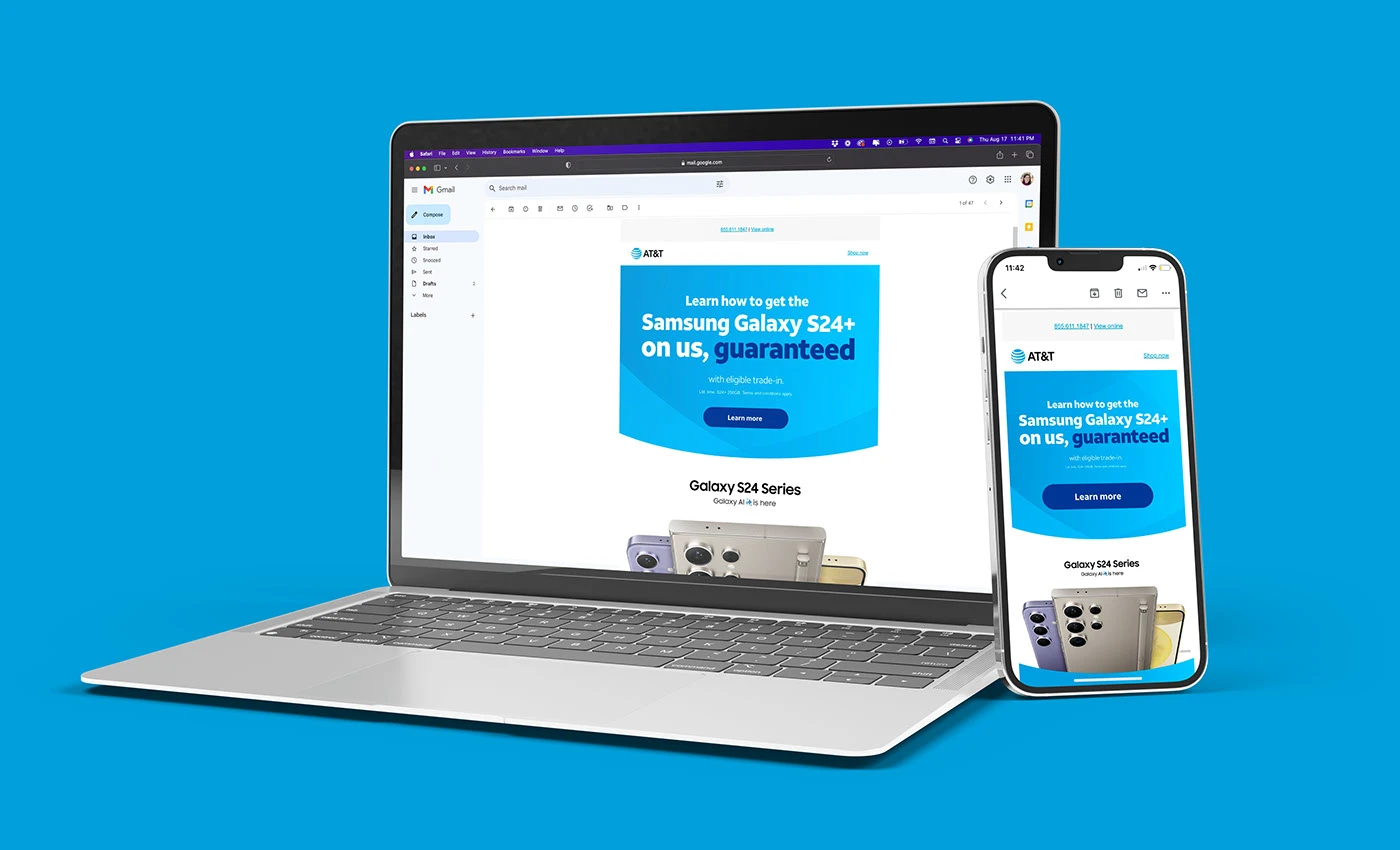
Blue, curved backgrounds and buttons create a repeatable language. The library contains pieces of different lengths and content. Seeing them together lets us study how a brand remains recognisable while changing its offer, protagonist or argument.
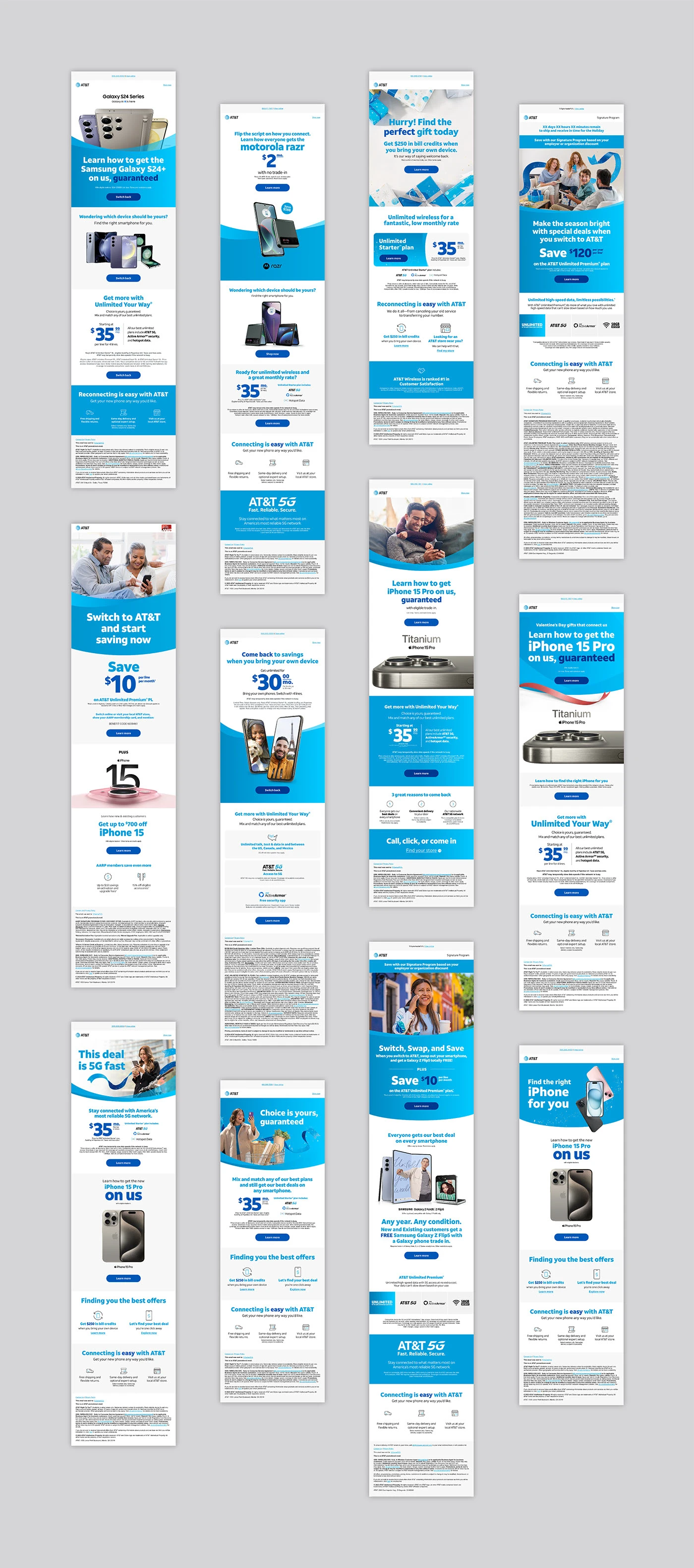
The interest lies in the consistency a programme of recurring production requires. The recipient should recognise who is speaking before reading every condition of the offer. Each message still needs its own hierarchy: an offer, explanation and reminder are not solved in exactly the same way.
The creator explains that she edited these emails to meet the client’s specifications and prepared them for development. That scope deserves precise credit. In recurring production, checking fonts, colours and versions is part of design: a repeated template error can travel through the entire library. The case lets us consider both the visual result and the preparation work supporting it.
An idea for 2027. Keep each template’s purpose and test results alongside it. An update layout might accommodate two products and a button; an invitation needs a date, venue and way to register. Test long headings, missing images and different button labels before handing it over. Include a version actually received on mobile and another on desktop. Whoever prepares the next send will have a concrete reference and know which parts they can change without losing the brand’s design principles.
7 First Aid Beauty gives a promotion visual rhythm
Whitney Holland documents her art direction, graphic design and animation for First Aid Beauty emails in 2018. The selection brings together promotions and pieces linked to different purchase moments. It is an older reference we revisit for the way it combines a simple commercial message with specific graphic devices.
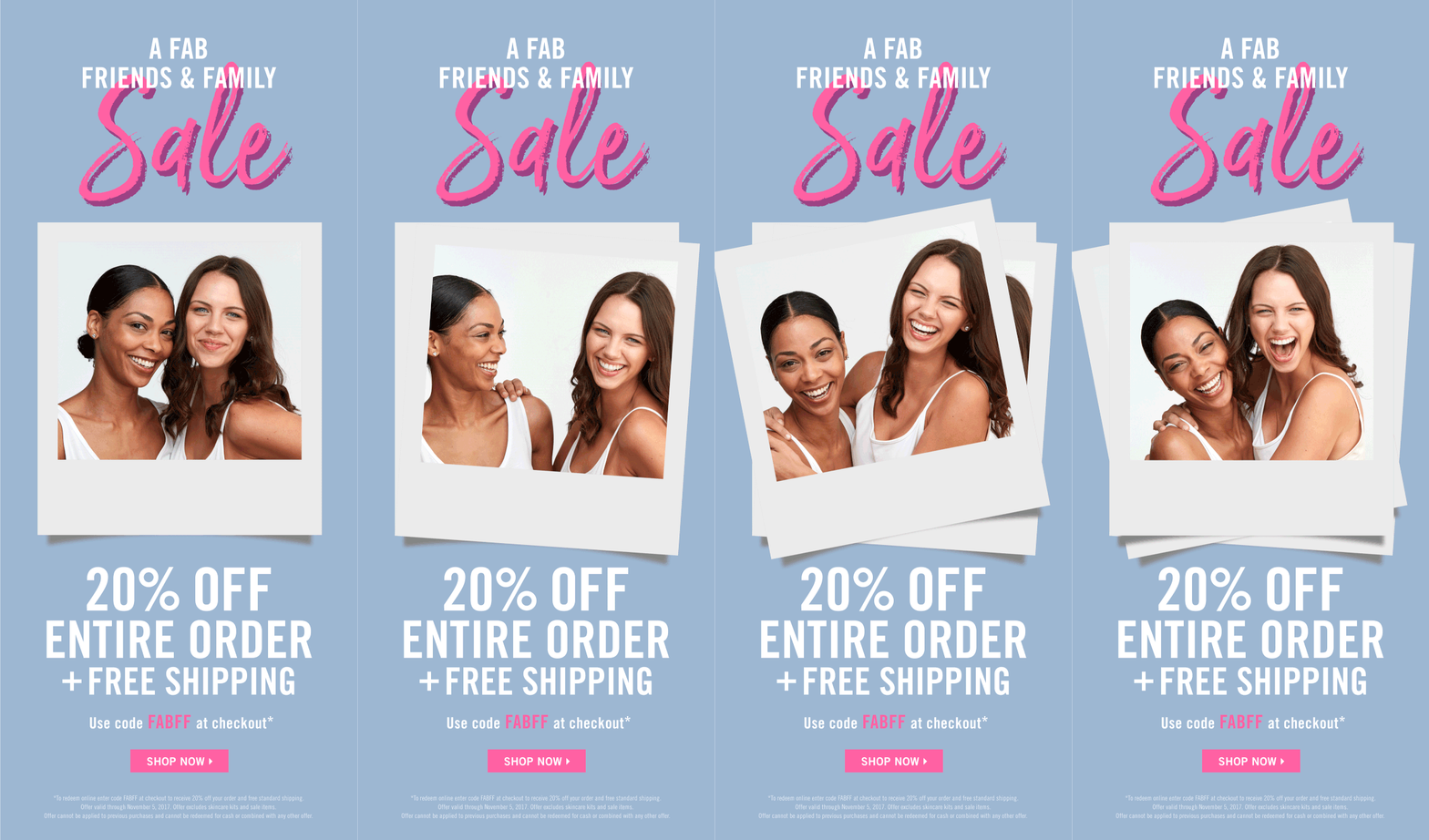
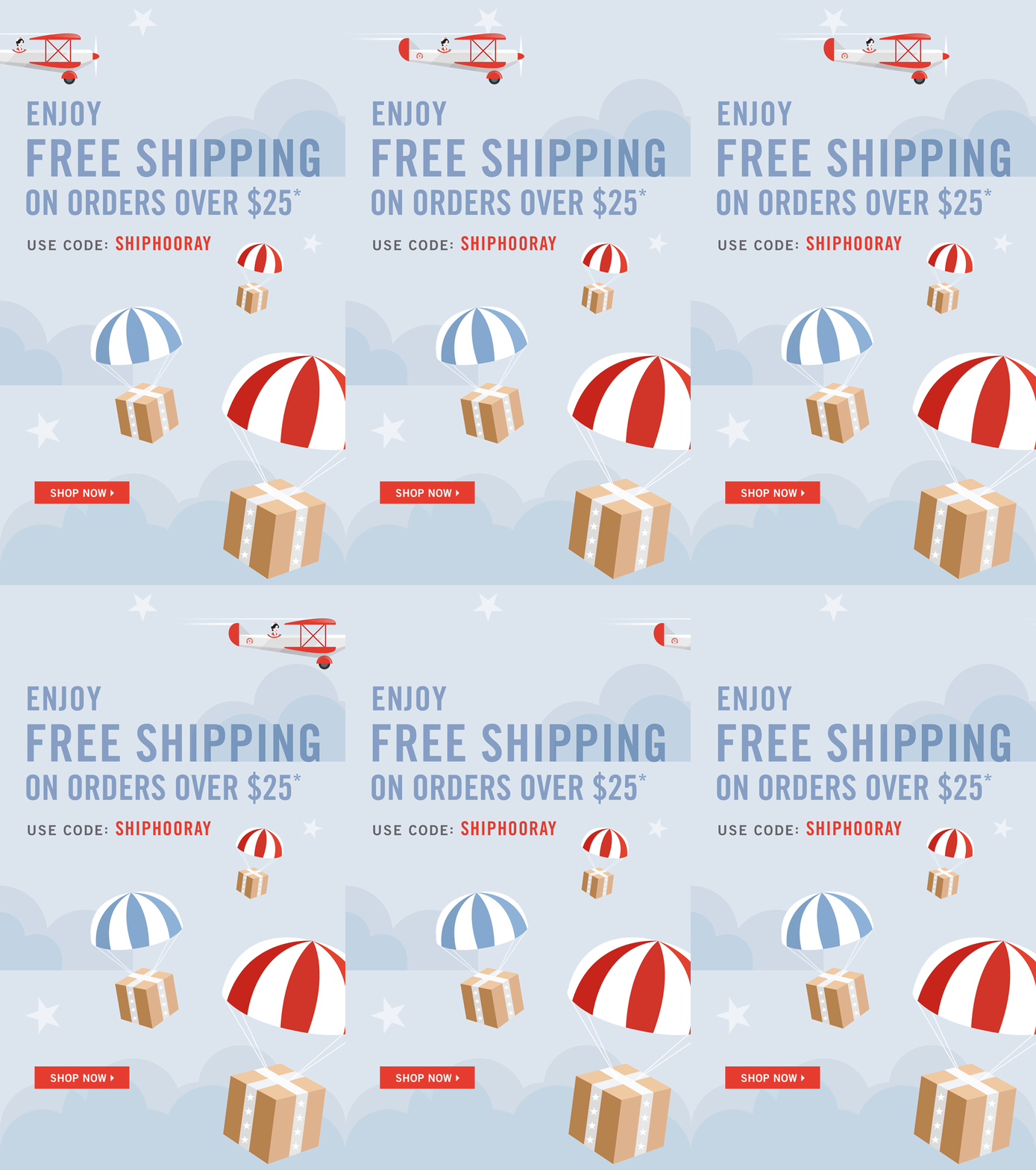
The images use soft colours, large typography and details that explain the message’s subject. In one piece, framed photography and lettering place the promotion in the context of friendship. In another, parcels and transport elements accompany shipping information. Illustration has a job within the message.
Animation adds rhythm, but the hierarchy remains visible in the frames. We can recognise the subject, locate the highlighted information and find the button. That is the relationship we care about: movement should reinforce a reading that already makes sense, rather than becoming the only place where an essential detail exists.
A promotion is also part of the brand’s voice. It can be clear and commercial without seeming unrelated to the rest of its communications. Colour, photography and tone should respond to the product and occasion as well as the promotional claim.
An idea for 2027. Start with a static execution that makes the promotion, date and next step identifiable. Then add purposeful motion: a parcel arriving, a transition between colours or an illustration explaining the occasion. Keep essential conditions outside the animation and check what happens if it does not play. Before sending, test the promotional code and the button’s destination too. The illustration can be playful; the offer needs to make sense at first glance.
8 CH+UK turns a cultural calendar into a publication
In 2019, on-IDLE and Jade Innes present the redesign of CH+UK’s monthly newsletter, covering cultural activities by Swiss creators in the UK. The project proposes a Mailchimp template the team can update and shows a comparison between the previous and new structures.
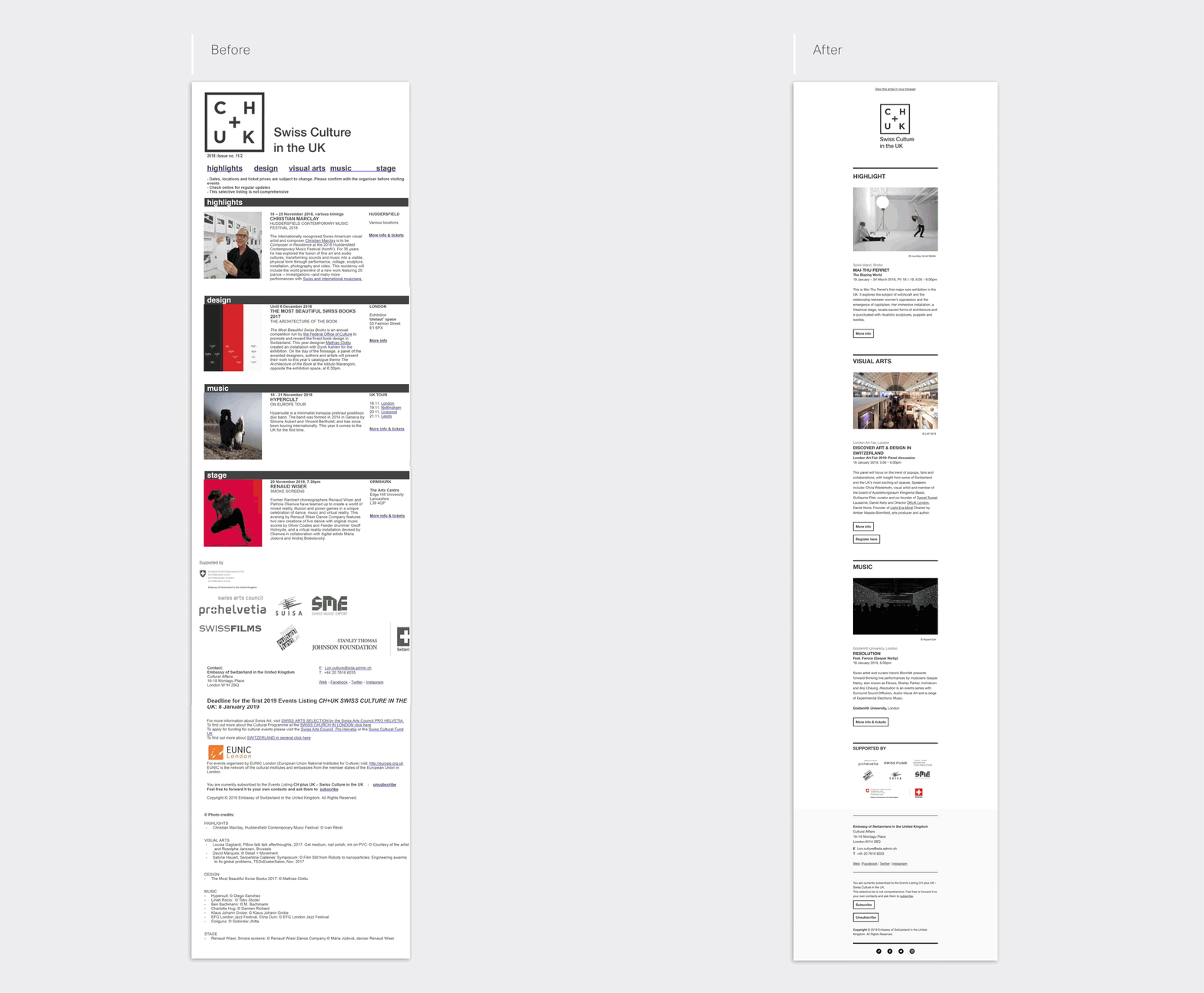
The redesigned version separates sections with rules and headings, gives images space and places each activity’s information in a reading unit. Buttons indicate how to find out more or move towards registration. Black and white allows photography to add variety without breaking the overall composition.
It is a useful reference for newsletters bringing several pieces of content together. More than one action can be reasonable when the subscriber expects a selection. What matters is that each block has a purpose and the publication retains a clear order. A cultural calendar need not look like a promotion for a single product.
We are also interested in maintenance. A regular publication needs a structure that works when photographs, headings and the amount of information change. The team should be able to prepare it using shared editorial and design principles. The ability to repeat without deteriorating is part of design quality.
An idea for 2027. A bookshop hosting events could maintain three sections: an opening recommendation, two new titles with a brief comment, and the next author event with its date. Each edition, the team would decide what deserves the lead position. Links would do different jobs: discover a book or reserve a place. CH+UK’s calendar approach helps explain why several buttons can make sense when the reader has subscribed specifically to receive a selection.
How to plan your email marketing campaigns for 2027
The references above show ways to design and organise messages. Applying them requires decisions about your own business. Start with the relationship you want to maintain and the resources available to sustain it. An ambitious newsletter nobody can prepare will end up relying on each week’s urgency.
Define why someone would want to subscribe
The list’s proposition should be specific. It might offer updates, an editorial selection, event information or resources connected to a service. Explain what the person will receive and how often you can deliver it. The subscription promise becomes your principle for choosing future content.
Write the promise as though it already appears beside the form. For example: “Once a month, three ideas to get more from your home and a selection of pieces to go with them.” That sentence proposes a frequency and an editorial task you can check. Before publishing it, establish whether your team can produce those ideas using original material. The list starts to have personality when someone knows what to expect from the next email.
Write the journey before designing the pieces
Separate scheduled sends from messages responding to a customer’s situation. A seasonal launch has a shared date; a welcome depends on when someone subscribes. Write down what triggers each message, which information it needs and when it should stop being sent. Also review what happens if someone receives several messages close together.
| Moment | Potentially useful content | A sensible action |
|---|---|---|
| The person subscribes | An introduction to the brand and what they will receive | Explore a selection or an introductory resource |
| There is a relevant update | What changes and who might find it interesting | View the update in context |
| A question comes up regularly | An original explanation, example or guide | Read the resource or ask the team |
| The person is already a customer | Use, care or the service’s next step | Get value from what they have bought or commissioned |
The table is Lead the Mood’s editorial proposal, not a sequence attributed to the selected brands. Adjust these moments to the relationship you actually have with customers. If there is not enough information to automate something yet, start with a simple process you can review.
Make the subject, content and destination tell the same story
The subject should create an expectation the body can fulfil. Preview text can complete that idea without repeating it. On opening, the reader should quickly find the reason for the message and a clear action. After the click, the page needs to continue the same proposition.
Continuing the kitchenware example, we would write the subject as “Three ideas for your outdoor table” and the preview text as “Tableware, textiles and a simple way to bring them together”. The body would show the three ideas, and a “View the selection” button would open a page with those same products. This is our own suggestion to illustrate continuity. If the destination is a general catalogue without that selection, first prepare the page that fulfils the promise.
If you need to coordinate that voice across channels, brand content work helps connect email with the website and social media. Coherence is apparent in what you say and in what the person finds afterwards.
Review the received message as well as the design
Send tests to the email clients relevant to your audience. Check mobile, desktop, image loading, text length and contrast. Review fallbacks for personal data: an empty name should not produce an odd greeting. Click the buttons and confirm they lead to the appropriate destination.
Essential information and actions should remain readable when images fail to load. It is also important to distinguish an animation presenting a project, such as the CH+UK comparison, from animation that forms part of the email, such as the First Aid Beauty pieces. A gallery helps you study design; the received message lets you test how it works.
Ask your provider to review domain authentication. Gmail’s official sender guidelines require SPF or DKIM for all senders, and SPF, DKIM and DMARC for bulk senders. For those sending more than 5,000 messages a day to personal Gmail accounts, marketing and subscription emails must support one-click unsubscribe and display a visible unsubscribe link. Google recommends configuring all three authentication methods for other sending volumes too. Check these requirements in the sent message together with your provider.
Interpret data in relation to your objective
A recorded open does not, on its own, prove someone read the message. Mailchimp explains that some filters can open emails and click links before the recipient does; understand how your platform identifies that activity. See its documentation on spam filters and automated activity.
For an invitation, we would examine how many people reach the event page and how many complete a booking. For a product selection, we would follow visits to the collection and related purchases. Record unsubscribes, bounces and replies too: they are part of the programme’s experience. If there are clicks but few bookings, open the page from the email and review the date, availability and form. The report helps locate a question; reviewing the journey helps answer it.
Write a hypothesis before comparing variants. For example: “Readers will understand the selection better if we open with the products on a real table.” Keep the subject, offer and destination unchanged to study that opening, provided your platform and list size allow a useful comparison. With few recipients, support the numbers with replies and observation of the journey; avoid turning a small difference into a sweeping conclusion. Document what you will change in the next send.
Prepare the first month at a sustainable pace
In the first week, define the subscription promise, review where contacts come from and decide who prepares each edition. In the second, build the template and send welcome-message tests. In the third, prepare a campaign with original content and check the entire journey to its page. In the fourth, review deliveries, responses and actions at the destination. You will have a tested template, an initial journey and a decision for the next edition.
Assign responsibility for replying, too. A newsletter inviting questions needs a person at the other end. A shop with frequent updates requires more production than a service with a long buying decision; frequency should fit each situation. Setting aside time to select, review and reply helps sustain the programme after the excitement of the first send. That is where a relationship worth continuing in the inbox begins.
If you work with a local audience, our selection of email campaigns for local businesses can help define those relationship moments. For a pharmacy, see our year-round email ideas and pharmacy marketing trends for 2027 as well.
Frequently asked questions about email marketing campaigns for 2027
Are these campaigns from 2027?
No. They are earlier projects and sends, with their dates stated, selected to help prepare a 2027 programme. For Behance cases, we analyse work documented by its creators; for Graza and BAGGU, we examine the email preserved in Email Love’s archive.
What is the difference between a newsletter and an email campaign?
A newsletter usually maintains a recurring editorial proposition, with content the subscriber expects to receive. A campaign may respond to an update, an occasion or a specific objective. Both can share an identity and design modules. What changes is the reason for sending and the journey you propose.
Do I need to automate every email?
No. Start with moments you can define and review properly. A welcome can be a useful first step; a scheduled communication needs an editorial selection for each edition. Automation does not replace deciding what someone needs or checking when a message stops making sense.
Can an email be highly visual and still work well?
Yes, when art direction sits alongside a clear build. Test how the message arrives, preserve essential information and make the action easy. Photography, illustration and motion can express the brand, but a Behance presentation does not, on its own, guarantee compatibility with every email client.
How do I choose a tool for my 2027 campaigns?
Start with the data, integrations, journeys and team that will maintain them. Then check whether you can edit the pieces, review sends and understand reports. The tool should fit the programme you need to sustain. Buying a more complex platform will not resolve a content proposition you have yet to define.
For a hotel, these ideas can become a seasonal message, an invitation to discover a new experience or a reason for a past guest to return. The photographs, offer and booking destination need to tell the same story. Our email marketing for hotels connects that creative work with campaign planning and the practical work of sending it.
How can Lead the Mood help?
We can work on the strategy, tone, design and content of your email marketing, connecting it with the brand and website experience. If you need to review your starting point, a digital audit helps organise priorities. If you already have a campaign or programme in mind, tell us what you want to prepare.
Editorial selection and analysis by Lead the Mood for 2027 planning. References are attributed to the credited creators and brands. Dates refer to the projects or archived sends. Suggested applications are our editorial interpretation; we do not attribute commercial results to the examples.